Using git on private projects
At work I use git all the time. And I know my way around it pretty well. I love it. It’s one of my all-time favourite tools!
So it’s only logical that I use it for personal projects too. For projects I post on GitLab I follow the standard approach: create a new branch, commit changes to it, open a PR, merge it into main. Great 👌
However, when it comes to projects that are purely personal. Projects that will likely never be seen by anyone, much less contributed to, does this still make sense?
In my experiece: No. The classic git approach has way too much overhead.
But that sucks. git is awesome, and I want to be able to go back to the working version I had yesterday before I completely broke everything. I want to see (and revert) what the AI agent did to my code. I want to upload my code somewhere to keep it safe.
And I want all that without the work.
This isn’t new for me: I’ve done a version of this on and off since I was writing my Bachelor Thesis 10 years ago and used git to keep backups of thesis document.
(yes, I used git to track an .odt document 😅)
So what do I do?
The approach is extremely simple really. It started off as a tiny script that:
- Stage all files
- Commit all changes with a hardcoded message
- Maybe something like:
auto: commit changes
- Maybe something like:
- Push changes to remote
- Wait 30s, then go back to step 1
That is pretty much all it needs to do 🤷
Over the years I’ve evolved my script to do more things, like:
- Handle multiple folders at once
- Support per-folder config for various settings
- Pull changes regularly to avoid conflicts if there are remote changes
- Generate a dynamic message for each commit
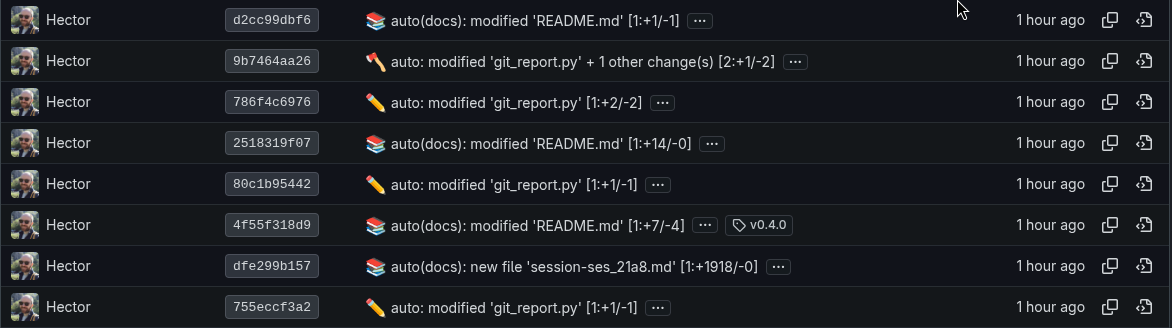
But the core logic is the same: every X time, stage everything, commit it, and push it up.
This ticks all the boxes of what I need:
- Zero effort, and doesn’t take me out of my flow
- All my code is backed up remotely
- All changes (either done by me or a rogue agent) are tracked
🙌
But this approach also gives me some extra insights that you might not get so easily from a traditional approach.
Since all commits are made automatically, and are always a constant time apart, I can estimate how much time I spent on a project. Not just how long ago the project started, but the time I spent actually working on it.
Why would I need that? Well, need is a strong word, but it’s pretty cool.
Of course, I built a simple tool to visualise stats for my git repos 😁
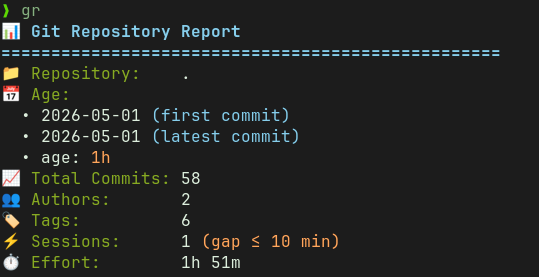
Sessions are groups of commits that are within X minutes of each other (I semi-randomly picked a 10min window).
So if a commit is on it’s own (outside a session), I assign it an estimated time (e.g. 1min), which is how long I worked before that commit was made. Then, inside a session, I just add up all the times between commits. Since the session window is a bit larger, it includes time spent working on the project outside of writing code. Things like waiting for builds, reading docs, thinking, arguing with an AI, and so on.
Of course, it will never be perfectly accurate. But for a completely automated system, it’s a pretty neat way to track time working on a project 👌
As a final note: this is what I do for personal projects, not anything that will be shared publicly. For a couple of reasons:
- The commits that get created are pretty useless for anyone trying to make sense or work on the project
- There is no context around why you did what you did
- All your bad ideas and drafts will be recorded for everyone to see
- No use of branches, it all goes to main: good luck to anyone else trying to contribute!
- It’s very easy to accidentally commit and push credentials, tokens, or other secrets to the repo - a real headache to then clean up 🙃
So follow this approach at your own risk, and make sure the remote repo is private.
// the end